Variables & templates
The action system and message systems within Monni are tightly coupled with a template library called liquidjs. To fully understand how the system works, You'd be doing yourself a favour to read the below terms.
| Term | Definition | Example |
|---|---|---|
| Variable / Context | A value stored behind a specific identifier or key. | A variable named name storing the value "monni". |
| Object / Variable / Context | Placeholder which will be replaced with a provided variable. | {{name}} or {{member.name}} |
| Tag | Markup that controls the logic of the template (loops, conditionals, etc.). They do not output text themselves. | {% if user.is_admin %} or {% for item in items %} |
| Filter | A method used to modify the output of a variable or text. | {{ "monni" | capitalize }} would capitalize Monni |
| Template | Text with objects, tags and filters | Hello {{name}}! |
| Rendered template | Templates which have been rendered. | Before Hello {{name}}! after rendering Hello monni! |
Variable substitution
Variable substitution/replacing objects is the simplest operation there is.
Context
name -> Monni
server -> Fish heaven
Template
Rendered template
Hello Monni, welcome to Fish heaven.
In most cases variables are what we would usually refer to as objects. Objects are variables which have multiple values. An example of this could be a member who has a name and join date.
Context
member ->
{name: "Monni", mention: "<@911945727402471455>", age: 20}
server ->{name: "Fish club", member_count: 252}
Template
Rendered template
Hello Monni, welcome to Fish club. You are member number 253.
Common Tags
If condition
If conditions allow you to add paths to your template depending on if something is true or false.
Context
name -> Monni
bans -> 20
Template
Rendered template
Monni has 20 bans.
If your message has odd spacing, try adding dashes like in the provided example {%- -%}
For loop
Sometimes variables or objects can contain a list. In these cases being able to go over each element one at a time is useful.
Context
members ->
[{name: "monni", cash: 2000}, {name: "dogfish", cash: -20}, {name: "trout", cash: 212}]
Template
Money Leaderboard
{% for member in members %}
	{{ forloop.index }}. {{ member.name }}: {{ member.cash }}
{% endfor %}
Rendered template
Money Leaderboard
- monni: 2000
- dogfish: -20
- trout: 212
Variable tag
Sometimes you may need to make your own variables. In the below example variables are used for sorting a list.
Context
members ->
[{name: "monni", cash: 2000}, {name: "dogfish", cash: -20}, {name: "trout", cash: 212}]
Template
{% assign sorted_members = members | sort: "cash" | reverse %}
Money Leaderboard
{% for member in sorted_members %}
	{{ forloop.index }}. {{ member.name }}: {{ member.cash }}
{% endfor %}
Rendered template
Money Leaderboard
- monni: 2000
- trout: 212
- dogfish: -20
You can find all of the supported tags and more in-depth information in liquidjs docs
Common filters
Filters edit the variable. This lets you do basic operations like appending text to variables or math. You can even hash the value. Context
number_1 -> 20
number_2 -> 20
Template
Rendered template
numbers: 20, 20
Plus: 40
Minus: 0
times: 400
You can find a full list in liquidjs docs
Liquidjs support
Most text fields in Monni are treated as templates, hence supporting liquidjs. A good rule of thumb is that if the context of a selector opens below the text box it supports liquidjs.
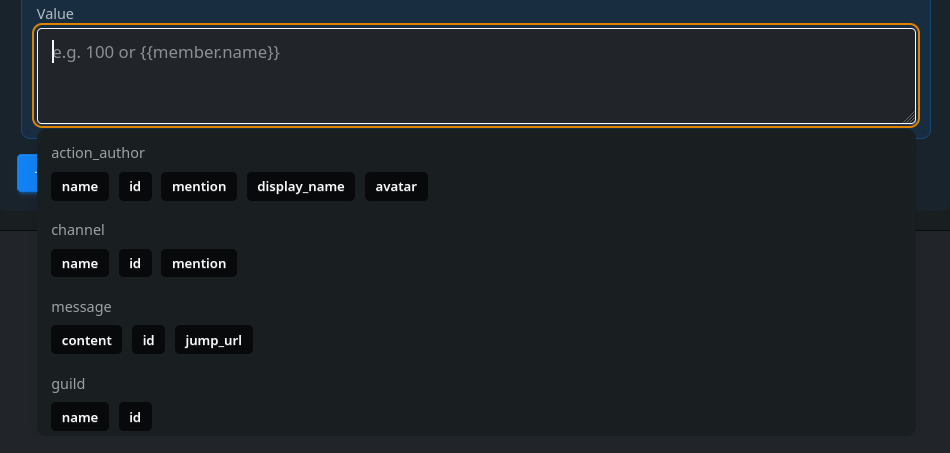
We limit the easy to abuse parts of template rendering heavily, such as loops and memory usage. If you run into issues relating to resource limits please contact us.