Discord timestamps explained

Discord has support for timestamps which are shown in users own local time and are automatically translated to their language.
In case you need to get timestamp fast you can generate them below
Timestamp structure
Timestamp consists of following structure
<t:UNIX:FORMAT>
t tells discord this is timestamp.
UNIX is Unix time. Its a way to keep track of seconds from the unix epoch of january 1st, 1970 UTC. They are good for saving dates without the “worry” of timezones. Hence discord uses them for timestamps
FORMAT tells discord the style for displaying the time like if it should be relative or if it should include minutes or only the year, month and date. You can find different format options below.
Timestamp examples
In the examples following, unix timestamp 1653043103 is used with timezone being utc+3 EEST.
| Style | letter | Input | 12h | 24h |
|---|---|---|---|---|
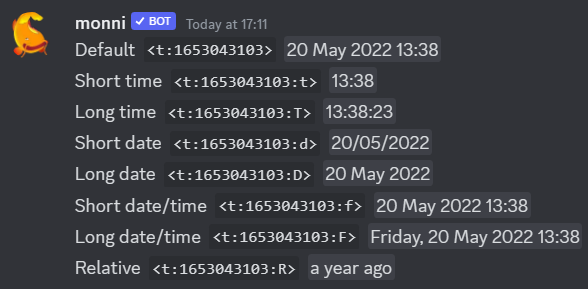
| Default | None | <t:1653043103> | May 20, 2022 1:38 PM | 20 May 2022 13:38 |
| Short time | t | <t:1653043103:t> | 1:38 PM | 13:38 |
| Long time | T | <t:1653043103:T> | 1:38:23 PM | 13:38:23 |
| Short date | d | <t:1653043103:d> | 05/20/2022 | 20/05/2022 |
| Long date | D | <t:1653043103:D> | May 20, 2022 | 20 May 2022 |
| Short date/Time | f | <t:1653043103:f> | May 20, 2022 1:38 PM | 20 May 2022 13:38 |
| Long date/time | F | <t:1653043103:F> | Friday, May 20, 2022 1:38 PM | Friday, 20 May 2022 13:38 |
| Relative | R | <t:1653043103:R> | a year ago | a year ago |
Format of the timestamp (12h or 24h) changes according to your language settings.
Timestamps being rendered in discord

Want to know more about markdown? Enjoy our in-depth guide on whats possible.
Useful resources
Third party discord timestamp tool
Discord documentation section outlining timestamps.
Gist on how timestamps work
Wikipedia article on UNIX time system